Voice typing
that stays on your PC
Hold a key, speak, and let go. Murmur writes clean text and pastes it into the app you are using.
Currently available for Windows. macOS and Linux support is planned. Free and open source under the MIT license. The installer arrives when the first release is published.
It cleans up how you talk
Pick a sample and watch Murmur turn speech into text. Murmur removes the fillers, keeps your last word, and writes numbers, names and lists the way you would type them.
You said
hey um can you send me the the invoice for october when you get a chance thanks
Murmur writes
Hey, can you send me the invoice for October when you get a chance? Thanks.
These are written samples. This page does not use your microphone or send anything. If a result is only one or two words, or if cleanup fails, Murmur gives you the raw transcript.
Your voice stays on your PC
Murmur runs two AI models on your computer. One turns speech into text. One cleans the text up. Your voice and your words never leave your PC.
- About 3.2 GB
- Murmur downloads its two models on the first start. After that you can dictate without an internet connection.
- 25 languages
- English, Spanish and 23 more.
- Free
- The source is on GitHub under the MIT license.
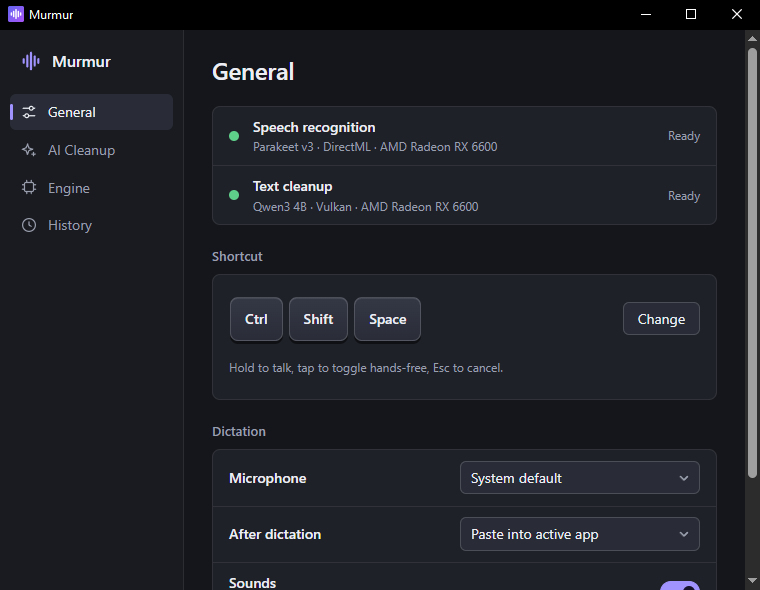
General
Speech recognition
Speech model not downloaded
Text cleanup
Cleanup model not downloaded
Models are missing
Murmur needs to download its speech and cleanup models before it can transcribe.
First run: Murmur needs its models before it can transcribe.
Shortcut
Hold to talk, tap to toggle hands-free, Esc to cancel.
Listening. Murmur hears you. A live bar shows your microphone level.
Hands-free. You tapped the shortcut. Recording continues until you tap again.
Transcribing. Murmur turns your speech into text.
Polishing. Murmur cleans up the text.
Done. The text is in your app.
Error. The overlay shows a short message.
One shortcut, any app
Click into any text box, such as an email, a chat or a document. Then use the shortcut.
- Hold Ctrl+Shift+SpacePush to talk. Recording stops when you release the keys.
- Tap itHands-free. A tap is a press under 350 ms. Recording continues until you tap again.
- Press EscCancel. Nothing is pasted.
Murmur ignores clips shorter than 0.3 seconds or without sound. After you dictate, it pastes with Ctrl+V and restores your clipboard text, or it only copies to the clipboard. You choose in Settings.
Your words, spelled right
Add the names and terms the cleanup must spell exactly. Add replacements for phrases you always want written the same way. Murmur applies replacements after the cleanup.
In Settings, “Find terms in your text” suggests terms from text you paste or open (.txt, .md, .srt or .vtt). Murmur does not keep that text. History keeps your last results on your PC, with the raw text next to each one.
Vocabulary
Names and terms that the cleanup should spell exactly as you type them here.
Replacements
Always swap a spoken phrase for fixed text, such as an address or a code snippet.
History
-
Let’s do this first, then put these things here so we can have this set up.
Mm, lets do this first and then I don't now, put these things here to to mhm be able to have good
-
Hey, can you send me the invoice for October when you get a chance? Thanks.
hey can you send me the invoice for october when you get a chance thanks
-
The meeting is moved to Thursday at 3 PM. Please bring the Acme report.
um so the meeting is moved to thursday at three p m and uh please bring the ack me report
How it works
First, Murmur listens.
Both models run on your computer.
Microphone
Murmur records your voice from the microphone. A live bar shows the level. It ignores clips shorter than 0.3 seconds or without sound.
Raw transcript
um so the meeting is moved to thursday at three p m and uh please bring the ack me report
NVIDIA Parakeet TDT 0.6B v3 turns the recording into text. It supports English, Spanish and 23 more languages.
You said
um so the meeting is moved to thursday at three p m and uh please bring the ack me report
Murmur writes
The meeting is moved to Thursday at 3 PM. Please bring the Acme report.
Qwen3 4B Instruct 2507, a small language model, fixes the text.
Active app
The meeting is moved to Thursday at 3 PM. Please bring the Acme report.
After dictation
Questions
What does the first start download?
Two models, about 3.2 GB in total: NVIDIA Parakeet TDT 0.6B v3 for speech and Qwen3 4B Instruct 2507 for cleanup. They are saved in %APPDATA%\com.murmur.app\models. After that, dictation works without an internet connection. The first start after an install loads the models and builds a cache, which takes about 10 seconds. Later starts take about 3 seconds.
Which platforms does Murmur support?
Murmur currently supports Windows. macOS and Linux versions are planned. When the first release is published, run Murmur_x.y.z_x64-setup.exe from the Releases page. You do not need administrator rights. The installer is not signed, so Windows can show “Windows protected your PC”. Click More info, then Run anyway.
What hardware does it need?
Murmur can use your graphics card (GPU) to work faster. If you have no suitable GPU, you can set speech recognition to use the processor (CPU) in Settings. Settings also shows which device the cleanup model uses. There is no published minimum specification yet, and the models need about 3.2 GB of disk space.
Does anything leave my computer?
No. Both models run on your computer, so your audio and text stay there. Only the first-run model download uses the internet. History and settings are files in %APPDATA%\com.murmur.app, and you can clear history in Settings.
Which languages does it support?
25 languages: English, Spanish and 23 more. The cleanup keeps Spanish as Spanish.
What if the cleanup gets it wrong?
If the result is only one or two words, or if the cleanup fails, you get the raw transcript. You can also turn AI cleanup off in Settings or from the tray menu.
What are the limits?
After pasting, Murmur restores only text on the clipboard, not images or files. While Murmur processes a clip, it ignores a new hotkey press. Clips shorter than 0.3 seconds or without sound are ignored.
Does it cost anything?
No. Murmur is free, and the source code is on GitHub under the MIT license.
Hold a key.
Say it.
Free and MIT licensed. Currently supports Windows; macOS and Linux support is planned. The installer arrives when the first release is published. The first start then downloads about 3.2 GB of models.